
Chatterbox
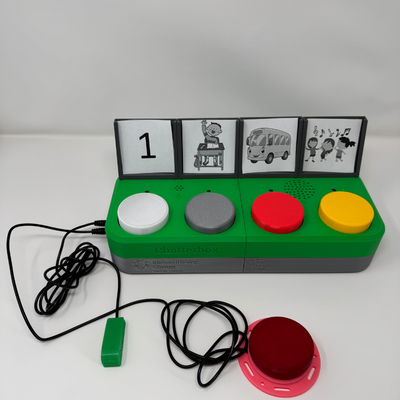
The Chatterbox allows users with visual impairment to communicate through switch scanning. Messages can be recorded onto the device, and played back by the user. The Chatterbox relies on audio instead of visual cues to facilitate switch scanning.
 Electronics
 Custom PCB
 3D Printing
 Software
 6
6 42
42 5
5 844
844Device Information
Overview
The Chatterbox is an augmented and alternative communication (AAC) device for users with complex communication needs and visual impairment. It can be used to introduce, learn, and assess the appropriateness of switch scanning for new users.
How To Use
A brief Quickstart Guide and full User Guide are available with the file downloads.
There are three levels of messages that can be stored and selected to playback. Each level has up to four messages that can be played back. Levels can be changed by sliding the “Level” switch on the back of the Chatterbox.
Recording messages:
Slide the “Mode” switch to the recording mode, indicated by all lights blinking at the same time. Hold down one of the switches on the top of the Chatterbox, and wait for all other LEDs to stop blinking. While still holding the switch down, record the message. Once finished, release the switch. All LEDs should start blinking again.
Replaying messages directly:
Press a switch on the top of the Chatterbox to replay the message at that position (level and message number). This works in recording or playback mode.
Single switch scanning:
Plug an assistive switch into the “Select” port on the side of the Chatterbox. While in playback mode, press the switch once to start switch scanning. The messages will start at the first message on that level, and play each message with a pause between the messages. To select a message to replay, press the assistive switch again. To go to the next message, wait for the pause between messages to end, as the device will automatically move to the next message. If no message is selected by the end of the pause after the last message, the Chatterbox stops switch scanning and the user will need to press the assistive switch again to restart.
Dual switch scanning:
Plug an assistive switch into both the “Select” and “Next” ports on the side of the Chatterbox. The “Select” switch works as in single switch scanning, but the “Next” switch allows the user to advance to the next message whenever they choose by pressing the switch.
Changing the pause between advancing messages:
Use the “Speed” slide switch at the back of the Chatterbox to change the length of the pause between messages. The three default settings are two, four, and six seconds (positions 1, 2, and 3, respectively).
Disability Type Description
The Chatterbox is useful for people with complex communication needs, especially those who also have visual impairment.
Estimated Cost (CAD)
Maker Information
Skills Description
Building the Chatterbox requires ordering custom PCBs, basic soldering, and uploading Arduino firmware to the device.
Print Time (hrs)
29
Assembly Time (hrs)
2
Tools Needed
Common Hand Tools;3D Printer;Soldering Iron
Build Instructions
The Chatterbox consists of off-the-shelf electronics and hardware, 3D printed parts, and three different custom printed circuit boards (PCBs).
For step-by-step build instructions, please refer to the Maker Guide.
Project Link
Please login or register to agree to the MMC Terms of Use to access the Project Link
License
Attribution
The Chatterbox was designed and documented by the Neil Squire Society.
This device was requested by occupational therapists with the Surrey School Board.
The Chatterbox firmware and hardware is based on the Open Playback Recorder.
Contributors:
- Stephan Dobri. Design, documentation, verification. Neil Squire Society / Maker Making Change.
- Brad Wellington. Open Playback Recorder firmware and hardware. Neil Squire Society / Maker Making Change.
- Jake McIvor. Neil Squire Society / Maker Making Change.
- Surrey School AAC Team. Design feedback, validation.
- SET-BC. Design feedback, validation.
- Augmented and Alternative Communication - Interaction and Technology Lab (AAC-IT) at Queen's University.
- SpikedCola. Design Feedback.
Reviews

There are no reviews for this device