
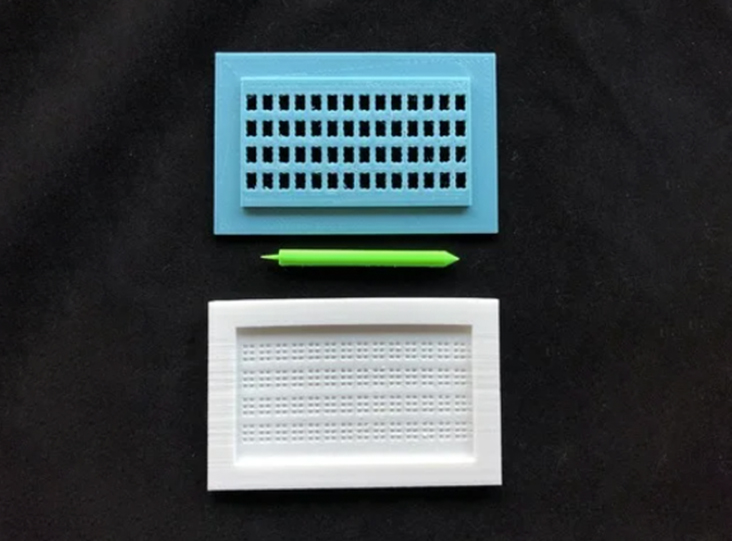
Braille Business Card Slate and Stylus Set
If you want to easily make your business cards accessible for Braille readers, the Braille Business Card Slate and Stylus Set is just the tool for that.
 3D Printing
 5
5 66
66 1
1 1.6k
1.6kDevice Information
Overview
The business card slate and stylus set allow you to write braille on a standard size business card (8.9 x 5.1 cm). The set includes a stylus and a two halves of a slate. The stylus has a long pointed end for adding braille dots, and a shorter end designed to erase braille dots. You can 3D print all the components.
The 3D printed Business Card Braille Slate and Stylus Set makes embossing Braille on standard cards (3.5" x 2") quick and easy. The slate features 4 rows of 14 cells so you can emboss Braille just about anywhere on your business card.
How To Use
Sandwich a business card between the bottom and top half of the slate. Using the pointed end of the stylus, gently emboss each cell in a circular motion, ensuring not to puncture the paper. Emboss the braille in reverse so the raised bumps are right side up.
Disability Type Description
This device is intended for people with low vision or who are blind, and are Braille readers. Teachers and parents of young readers may also find this tool helpful in educational settings.
Estimated Cost (CAD)
Maker Information
Skills Description
This is a beginner level build that involves 3D printing.
Print Time (hrs)
4
Assembly Time (hrs)
0.08
Tools Needed
3D Printer
Build Instructions
This build consists of three 3D printed parts: a top, a bottom, and a stylus.
Print Setting
- 0.2 mm layer height
- 20% infill
- No Supports
Project Link
Please login or register to agree to the MMC Terms of Use to access the Project Link
License
Attribution
The Braille Business Card Slate and Stylus was designed by M. Cantino Madelyn Hampton (Thingiverse user PortlandPrints) and was published under a Creative Commons - Attribution - Non-Commercial license.
Reviews
Braille Business Card Slate and Stylus Set
KarSangr78
The process was Ok, I guess. The 3-D printed stylus was sub-par so I made a trip to my metal shop and turned one out of aluminum. The stylus seems to be too sharp and makes a puncture rather than a dimple.