
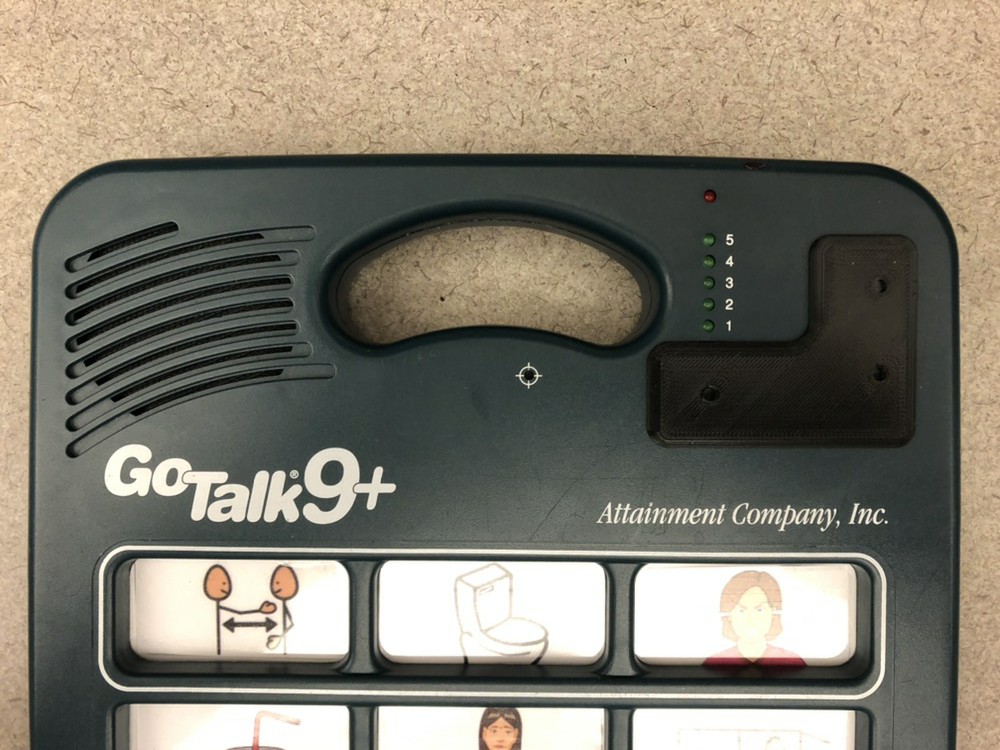
Go Talk Button Guard
If you want to create a physical barrier between the buttons located in the upper right corner of a Go Talk® 9+ device, attach the Go Talk Button Guard while still allowing a pencil or similar device to interact with the buttons.
 3D Printing
 4
4 43
43 0
0 1.1k
1.1kDevice Information
Overview
This 3D printed button guard physically restricts access to the volume control and change level buttons located in the upper right corner of a Go Talk® 9+ Augmentative and Alternative Communication device. These buttons can be a distraction for people first learning how to use the device. Small holes over each of the buttons allows for individuals to still activate the buttons using a pen or other small object.
How To Use
Attach the Go Talk Button Guard to provide a physical barrier to prevent a user from activating the volume control or change level buttons with their finger. The buttons can still be pressed using a narrow object such as a pen through the small holes in the guard.
While the Go Talk 9+ has a lock feature to eliminate unwanted use of these buttons, this guard physically limits access to the buttons, which can encourage a new user to explore the other keys.
Disability Type Description
This device is intended for users of the Go Talk® 9+ AAC (Augmentative and Alternative Communication) device.
Estimated Cost (CAD)
Maker Information
Skills Description
This device requires beginner level 3D printing
Print Time (hrs)
1
Assembly Time (hrs)
0
Tools Needed
3D Printer
Build Instructions
The Go Talk Button Guard consists of a single 3D printed part and requires no additional assembly other than attaching it to the AAC device.
Print Settings:
- 0.2mm layer height
- 20% infill
- No Supports
A typical print uses about 6 grams of filament and requires about 30 minutes to print. This is about $0.25 worth of material.
After the print is complete, ensure there are no burrs or sharp edges. Ideally, the color of filament is chosen to match the color of the AAC device so it provides minimal distraction.
The guard is positioned over the buttons and either fixed permanently with adhesive (e.g. superglue) or temporarily using double-sided tape (e.g. UGlu).
Project Link
Please login or register to agree to the MMC Terms of Use to access the Project Link
License
Attribution
This design was created by James Kauppila based on a request from Michelle Anderson.
Reviews

There are no reviews for this device