
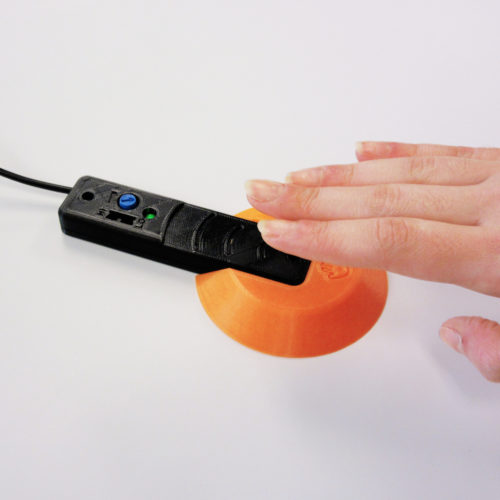
Light Proximity Switch
An assistive switch activated by motion (waving hand) or by covering the sensor (small finger movement).
 Electronics
 Mechanics
 Custom PCB
 3D Printing
 4
4 66
66 1
1 1.7k
1.7kDevice Information
Overview
The Light Proximity Switch is a low-cost assistive switch activated by waving a hand or limb over the device. This switch can be used to control electronics including phones, computers, adapted toys, and gaming consoles.
Users can adjust the motion sensitivity, and it also comes with an attachable circular base for users with low strength to reach the sensor area.
How To Use
Plug the 3.5 mm cable from the switch into the device you want to control. Wave a hand or limb over the sensor to trigger the device (a green LED should light up). Fine tune the motion sensitivity by toggling the black switch to "HI" or "LO" then fine tuning using the blue dial.
To attach the Circular Base, simply slide the base onto the switch until it clicks into place. This may take a bit of force.
Disability Type Description
Users who find traditional assistive switches hard to press or have small hand movement may find the Light Proximity Switch less straining to use.
People with disabilities that effect gross motor movement, like dyspraxia, may also find this device suitable as users can wave their limbs over the switch.
Estimated Cost (CAD)
Maker Information
Skills Description
The device is an intermediate difficulty build that involves assembly, 3D printing, and ordering custom PCB.
Print Time (hrs)
4
Assembly Time (hrs)
2
Tools Needed
Common Hand Tools;3D Printer;Soldering Iron;Specialized Tooling
Build Instructions
This build consists of multiple steps including ordering the custom PCB, ordering off-the-shelf components, printing the 3D printing parts, and assembling everything.
Print Settings:
- 0.2 mm layer height
- 20% infill
- Yes Supports (only for the Switch Top Case)
Detailed instructions are provided in the Assembly Guide, which is available to logged-in users via the Project Link. There is also a video build tutorial.
Project Link
Please login or register to agree to the MMC Terms of Use to access the Project Link
License
Attribution
Design and documentation by Neil Squire Society / Makers Making Change.
Contributors:
- Derrick Andrews
- Kristina Mok
- Jake McIvor
Reviews

There are no reviews for this device