
Number Aligner
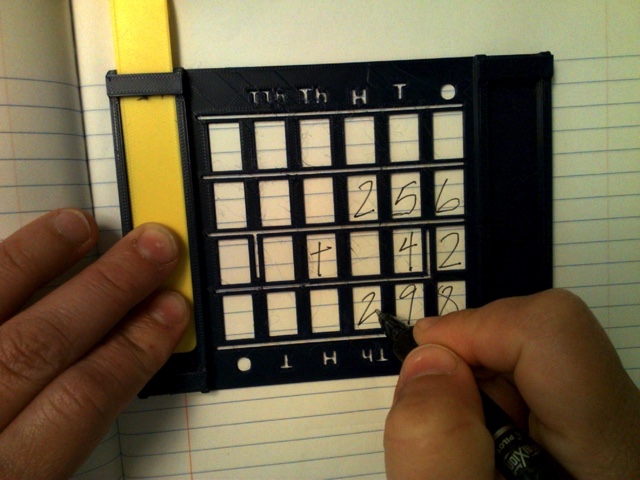
If you or your student struggle with writing numbers in a small area, the number aligner guides your writing so your calculations are clear and easy to read.
 3D Printing
 13
13 113
113 3
3 1.1k
1.1kDevice Information
Overview
The number aligner is a low-tech support for students with dysgraphia or fine motor issues that struggle with writing numbers in a small area.
The design consists 24 windows in a 6 by 4 arrangement, and horizontal and vertical guides in between each window to draw the "equal to" or long division lines. It also comes with a reversable guide ruler so writers can glide the number aligner across a page.
How To Use
Slot the guide ruler onto the number aligner and hook it to the top of the notebook or paper. Position the number aligner in the desired area and write.
Disability Type Description
This device is intended for students and adults with dysgraphia or fine motor issues that struggle with writing numbers in a small area.
Estimated Cost (CAD)
Maker Information
Skills Description
This project requires beginner level 3D printing and minimal assembly.
Print Time (hrs)
2.5
Assembly Time (hrs)
0
Tools Needed
3D Printer
Build Instructions
The number aligner consists of two 3D printed parts. If you would like to customize the size, the design files are available in both TinkerCAD and Fusion 360 formats.
Print Settings: (Thingiverse - Math Number Aligner)
- 0.2 mm layer height
- 20% infill
- Yes Supports
Project Link
Please login or register to agree to the MMC Terms of Use to access the Project Link
License
Attribution
Reviews
Number Aligner
JenDong95
Pretty easy to make, took a few attempts though. Because of how thin the aligner is, it didn’t print amazing on an Ultimaker S3 (edges curled up). Did much better on a Bambu X1 Carbon though. Consider changing thickness to a couple mm more to fix this.