
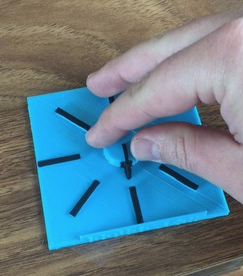
Tactile Rotor VoiceOver Knob
This is a simple model that can be used as a tactile demonstration when teaching the rotor gesture for iOS VoiceOver screen reader.
 3D Printing
 0
0 11
11 0
0 640
640Device Information
Overview
The Tactile Rotor VoiceOver Knob is a simple, low‑cost 3D‑printed teaching tool designed to help blind and low‑vision users understand how the VoiceOver rotor gesture works on an iOS devices. It provides a physical representation of the circular “rotor” concept that VoiceOver users interact with on a touchscreen, helping make an abstract gesture more concrete and understandable for new users.
The model consists of two pieces, a square base and a circular disc, that spin smoothly together. When assembled, the rotating disc closely mimics the circular motion used in the VoiceOver rotor, providing a physical, tactile demonstration of an otherwise abstract touch gesture.
This device is especially useful for VoiceOver instructors, orientation and mobility trainers, accessibility educators, and support staff working with new VoiceOver users.
iOS VoiceOver is an accessibility feature built into Apple devices (iPhone, iPad, iPod touch, Apple Watch, and Mac) that helps people who are blind or have low vision use their devices. VoiceOver is a screen reader and users can control it using different gestures such as swiping, single tap, and double tap. The VoiceOver rotor is a virtual dial that users use a two finger gesture with to select options.
How To Use
After printing the two parts, the smaller circular piece is placed into the center of the larger square base, allowing it to spin smoothly.
Instructors can use the rotating disc to demonstrate how the VoiceOver rotor works, including clockwise and counter‑clockwise motion and how different rotor “positions” correspond to navigation options such as characters, words, headings, or actions.
The tactile model helps learners understand that the rotor behaves like a dial, reinforcing the mental model needed to successfully perform the gesture on an actual iOS device.
Disability Type Description
This device is intended for individuals who use VoiceOver, including people who are blind or have low vision, as well as instructors and trainers who teach VoiceOver concepts.
Estimated Cost (CAD)
Maker Information
Skills Description
This design only involves beginner level 3D printing.
Print Time (hrs)
2
Assembly Time (hrs)
0.08
Tools Needed
3D Printer
Build Instructions
Once you print the 2 pieces simply slide on the small circle to the middle of the big square and it spins very nicely.
Print Settings:
- 0.2mm layer height
- 15% infill
- No Supports
Project Link
Please login or register to agree to the MMC Terms of Use to access the Project Link
License
Attribution
Designed by Neal Mckenzie.
Reviews

There are no reviews for this device