
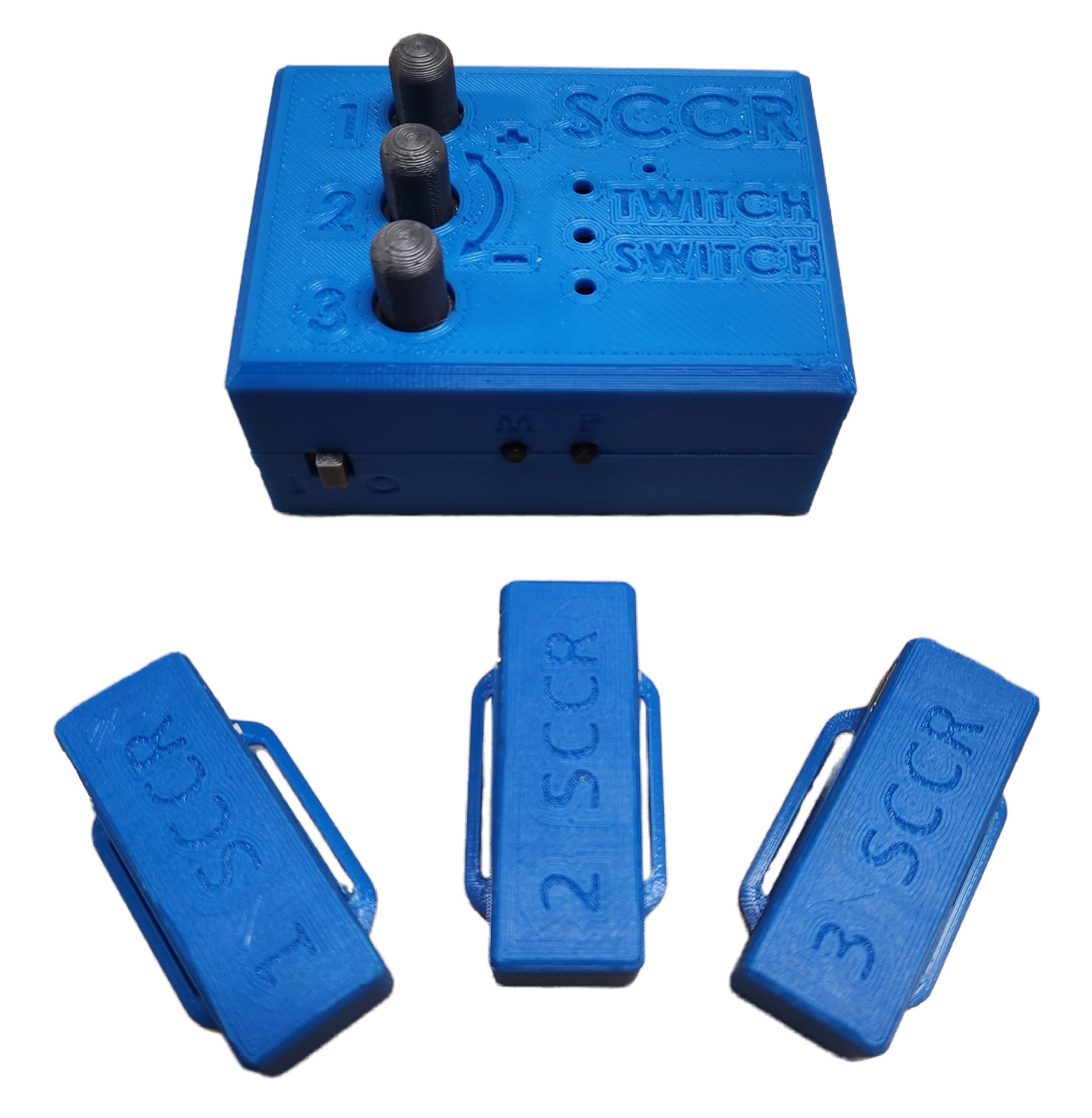
Twitch Switch
An alternative to assistive switches, the Twitch Switch allows you to activate up to 3 switch adapted devices, or emulate a mouse or keyboard with movement as subtle as twitching your eyebrow.
 Electronics
 Custom PCB
 3D Printing
 Software
 8
8 43
43 3
3 1.7k
1.7kDevice Information
Overview
The Twitch Switch is for users with limited movement capabilities. Up to three small wireless sensors can capture very small movements. The Twitch Switch can be used for activating up to three switch adapted devices or emulating a mouse or keyboard to operate a digital device such as a computer.
The Twitch Switch works best for someone who is only able to perform small movements. There are three sensors that can be placed wherever the user has the most controlled, repeatable, intentional movement. Sensor placement can include, but not limited to, on the user’s finger, wrist, foot, or head. The sensors are powered by rechargeable batteries and connect wirelessly to a controller. The sensitivity of each sensor can be adjusted using knobs on the controller.
The first way to use the Twitch Switch allows the user to activate up to 3 switch-adapted devices. Whenever the corresponding switch is moved (even slightly!), the switch-adapted device will be activated.
The second way to use the Twitch Switch is to control a digital device such as a computer, tablet, or smartphone. The Twitch Switch can connect via Bluetooth or USB, and has 3 modes: mouse mode, tablet mode, and keyboard mode (which is best for switch control).
Note: for those located in Canada who are interested in this device, there are a limited number of Twitch Switches available free of cost. Please contact the Rehabilitation Engineering Department at the Stan Cassidy Centre for Rehabilitation at SCCRRehabEngineering@horizonnb.ca
How To Use
Below is a brief summary of how to use the Twitch Switch. For more details, as well as accompanying photos, please see the User Guide.
Setup
Start by positioning the sensors where the user has the most controlled, repeatable, intentional movement. Sensor placement can include on the user’s finger, wrist, foot, or head. For more information see the User Guide.
Connecting to Host Device
If you would like to use your Twitch Switch to control a digital device (such as a computer, tablet, or smart phone), you can connect to your host device using Bluetooth or through a wired USB connection. If you would like to use your Twitch Switch to control a switch adapted device, plug in a male to male 3.5 mm cable to both the Twitch Switch Controller and the switch adapted device.
Wireless Connection to Digital Device
To connect via Bluetooth, turn on the sensors, and then turn on the main controller unit, then go to your computer, smart phone, or tablet, and turn on Bluetooth and pair to a new device. Select “Twitch Switch” and pairing will occur.
Wired Connection to Digital Device
To connect via USB, turn on the sensors, then plug in a micro-USB into the Twitch Switch Controller and plug the other end into your host device (some host devices will need an adapter, see the User Guide for more information).
Usage
To use with a switch-adapted device, simply activate the corresponding sensor (sensor 1 if plugged into jack 1) to activate the switch-adapted device.
To use with a digital device (such as a computer, tablet, or smartphone) there are three different modes: mouse mode, tablet mode, and keyboard mode.
- Mouse mode will move your mouse cursor up and down, left and right, and perform a left click.
- Tablet mode will perform a left click, scroll the page up, and scroll the page down.
- Keyboard mode, which is often used for switch control, will perform keypresses of F1, F2, and F3.
Changing Mode
To change modes between mouse mode, tablet mode, and keyboard mode, simply press the “M” button on the side of the enclosure.
Disability Type Description
The Twitch Switch is intended primarily for people who have some controlled, repeatable, intentional movement, but otherwise have limited mobility and/or dexterity. This device may be beneficial for users with cerebral palsy (CP), spinal cord injuries (SCI), amyotrophic lateral sclerosis (ALS), Multiple sclerosis (MS), muscular dystrophy (MD), locked-in syndrome (LIS), traumatic brain injury (TBI), or other disabilities or conditions that significantly limit movement. Although the sensitivity of the wireless sensors can be adjusted to meet the users unique movement, small “twitch” like movements are ideal for optimal functionality of the Twitch Switch.
Estimated Cost (CAD)
Maker Information
Skills Description
This build involves an intermediate level of 3D printing, and an advanced level of soldering, Arduino firmware, and assembly. It also involves ordering two custom PCBs, including a PCB with surface mount components. This build has some surface mount soldering.
Print Time (hrs)
6
Assembly Time (hrs)
4
Tools Needed
Common Hand Tools;3D Printer;Soldering Iron
Build Instructions
Note: for those located in Canada who are interested in this device, there are a limited number of Twitch Switches available free of cost. Please contact the Rehabilitation Engineering Department at the Stan Cassidy Centre for Rehabilitation at SCCRRehabEngineering@horizonnb.ca
The Twitch Switch hardware consists of off-the-shelf electronics and hardware components, 3D printed components, and two custom printed circuit boards (PCBs). It is divided into two main parts: the Twitch Switch Controller and the Twitch Switch Sensors. The build has some surface mount components to solder, which is more advanced than through hole soldering. The sensors use a custom programmer to flash the Arduino code to them, which involves creating this programmer with a breadboard and a few components. For more detailed build instructions, see the Maker Guide.
Project Link
Please login or register to agree to the MMC Terms of Use to access the Project Link
License
Attribution
The Twitch Switch was designed by the Rehabilitation Engineering Department at Horizon Health’s Stan Cassidy’s Centre for Rehabilitation (SCCR). Development was supported through the Government of Canada’s Innovation Science and Economic Development Accessible Technology Program (ATP). The ATP program enabled SCCR to deploy numerous Twitch Switches to users at reduced cost.
The latest design incorporates feedback and suggestions from numerous users, clinicians, and volunteer makers.
The latest design incorporates several commercially available open source hardware components from Adafruit. The Twitch Switch firmware utilizes the Arduino development platform, and a number of libraries developed and shared by the open source community. Full details are available on the GitHub repo via the Project Link.
Contributors to this iteration of the Twitch Switch
- Rachelle Bernier, Horizon Health Network.
- Marla Calder, Horizon Health Network
- Natasha Hanson, Horizon Health Network
- Dorian Hawkes, Horizon Health Network
- Rick McCaskill, Horizon Health Network
- Billie O’Connor, Horizon Health Network
- Kristen Culberson, Horizon Health Network
- Josie Versloot, Neil Squire Society / Makers Making Change
Reviews

There are no reviews for this device