
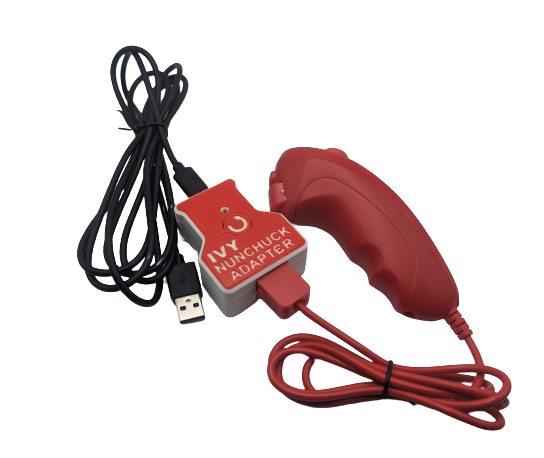
Ivy Nunchuck Joystick Adapter
If you love the freedom of your old Wii Nunchuk style controller the Ivy Nunchuck Joystick Adapter is an easy to use package that lets you plug it in anywhere you need a USB mouse, or USB gaming joystick.
 Electronics
 Mechanics
 Software
 7
7 29
29 0
0 1.9k
1.9kDevice Information
Overview
The Ivy Nunchuck Adapter allows a Nunchuck Controller to be used as a USB HID Mouse or USB HID Gamepad. The device is comprised of off-the-shelf electronics that are assembled without the need to solder into a 3D printed enclosure.
Nunchuck controllers have a thumbstick joystick and two buttons. The thumbstick has a range of motion of ±30° and approximately ± 15 mm of total motion. The activation force for the joystick is approximately 100 grams-force.
The overall cost of materials for the adaptor is $20 (plus $8 for component shipping). Paired with an old Nintendo Wii Nunchuk controller or a Nunchuck Controller replacement ($10-$20), this provides a cost effective solution for an input device.
How To Use
Setup
- Plug the Nunchuck Controller into the Ivy Nunchuck Adapter.
- Plug the USB-C end of the USB Cable into the Ivy Nunchuck Adapter.
- Connected the other end of the USB cable to the host device (use a suitable adapter if necessary).
Swapping between Mouse and Gamepad Mode
- While holding down the two buttons on the Nunchuck, press and release the Reset button on the Ivy Nunchuck Adapter. Release the two buttons.
- Press the C button to toggle between modes. The light on the Ivy Nunchuck Adapter will indicated the current mode: USB HID Mouse - Yellow, USB HID Gamepad - Blue.
- Press and release the Z button to set the mode.
- Reset the device.
Mouse Mode
- Move the joystick to control the cursor.
- Press the C button to left click.
- Press the Z button to right click.
Gamepad Mode
- Move the joystick to control the joystick.
- Press the C button to activate Button 1.
- Press the Z button to activate Button 2.
Disability Type Description
For anyone who likes the function of the Wii style nunchuk controller, and wants to expand it for use as either a USB mouse or USB gaming joystick.
Estimated Cost (CAD)
Maker Information
Skills Description
This is a fairly quick project to build involving some push-to-connect electronics, software loading and mechanical assembly.
No soldering required!
Print Time (hrs)
2
Assembly Time (hrs)
0.25
Tools Needed
Common Hand Tools;3D Printer
Build Instructions
This build consists of off-the-shelf electronics that are assembled into a 3D printed enclosure and flashed with firmware. For full details please refer to the Maker Guide.
Print Settings:
- 0.2mm Layer Height
- 15% Infill
- No Supports
Project Link
Please login or register to agree to the MMC Terms of Use to access the Project Link
License
Attribution
- Several previous projects have interfaced with a Nunchuck controller to use it as a mouse or joystick including USB Nunchuck Mouse.
- The Adafruit QT Py development board was designed by Limor Fried/Ladyada from Adafruit. The PCB design is available open source under a CC-BY-SA license.
- The Adafruit Wii Nunchuck Breakout Adapter - Qwiic / STEMMA QT board was designed by Limor Fried/Ladyada from Adafruit. The PCB design is available open source under a CC-BY-SA license.
- The firmware utilizes the WiiChuck library by Kevin Harrington (madhephaestus)) under a LGPL-3.0 license.
- The firmare also utilizes the FlashStorage library by Cristian Maglie (cmaglie) under a LGPL-2.1 license.
Reviews

There are no reviews for this device