
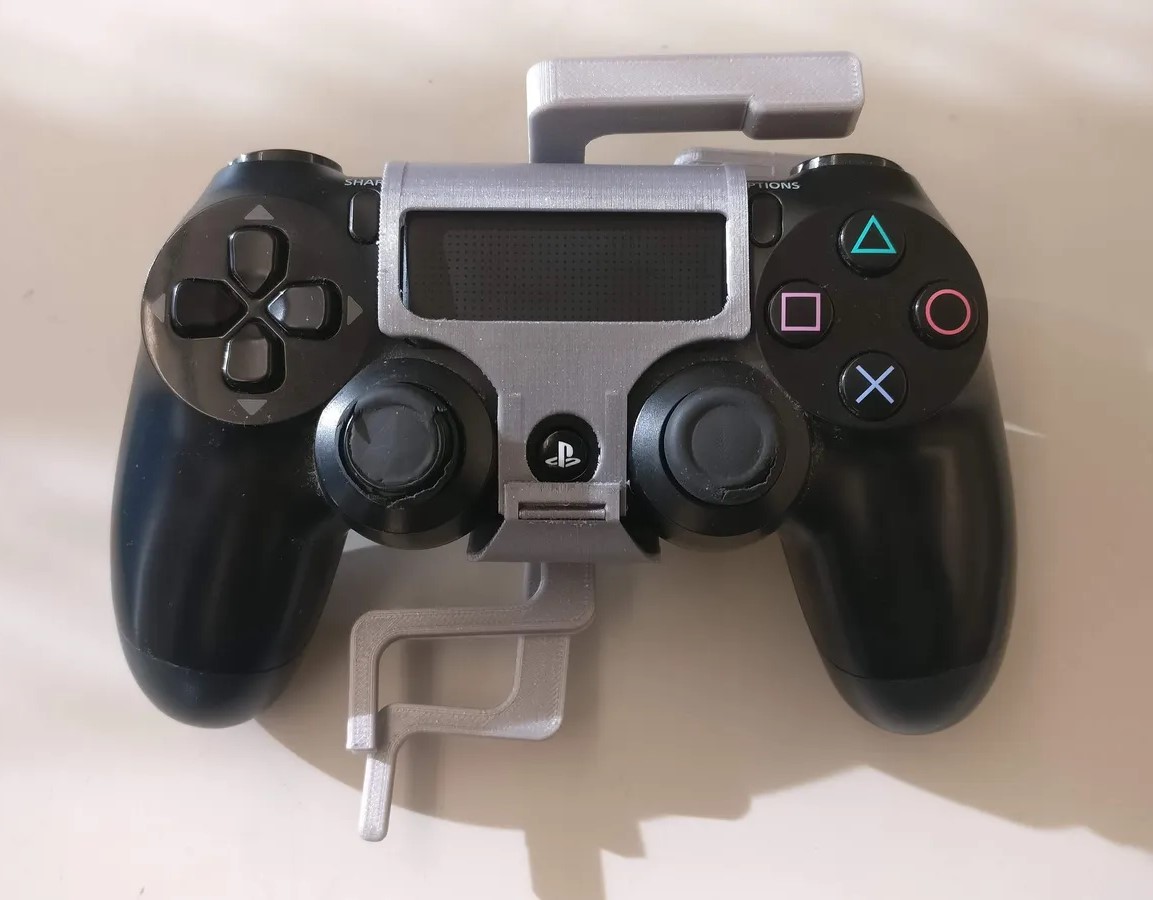
PS4 Controller Modification
If you find the right trigger on the PlayStation 4 Controller hard to reach, this 3D printed PS4 Controller Modification brings the trigger action closer so gamers can press with just their left hand.
 Mechanics
 3D Printing
 1
1 9
9 0
0 700
700Device Information
Overview
Oiginally designed for a gamer with limited dexterity in their right hand, the PS4 Controller Modification allows users to reach the R1 and R2 buttons using their left ring and pinky fingers. The 3D print is clipped onto the controller body and doesn't interfere with other buttons or indicators.
How To Use
Rest your left ring and pinky fingers on the 3d printed levers located near the left handle of the controller. To activate the rear buttons on the right side of the controller, pull the levers toward the handle in a squeezing motion.
Disability Type Description
Users who have limited dexterity in their right hand and finger may find this controller modification suitable.
Estimated Cost (CAD)
Maker Information
Skills Description
The device is a beginner build difficulty that involves 3D printing and minimal assembly.
Print Time (hrs)
5
Assembly Time (hrs)
0.5
Tools Needed
Common Hand Tools;3D Printer
Build Instructions
The design comes with four 3D printed parts: two for the lever and two for the casing. Combine the top and bottom halves of the case by fitting a straightened paper clip through the hole to create a hinge.
Then, secure the two levers to the case using a #8-3/4" screw and a #8-32 cap nut. Clip the case around the PS4 controller.
Print files are available at the Project Link or via the Download Link (requires log-in).
Print Settings:
- 0.2mm layer height
- 20% Infill
- Requires Support
Project Link
Please login or register to agree to the MMC Terms of Use to access the Project Link
License
Attribution
This device was designed by the UBC Enable Team, a sub-team of UBC Biomedical Engineering Student Team (BEST).
Reviews

There are no reviews for this device