
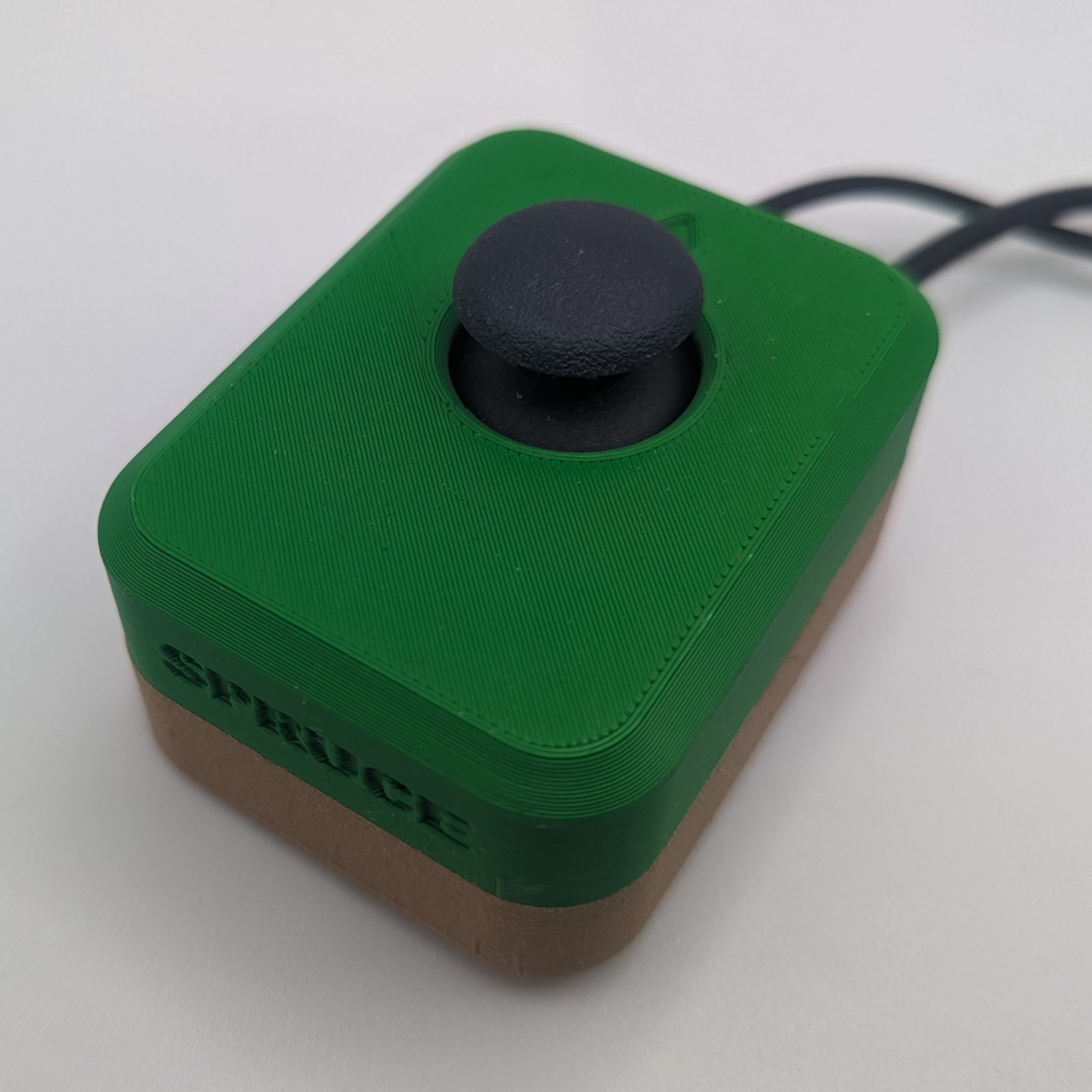
Spruce Mini Joystick
If you're looking for a standard joystick with a small range of motion and push button feature, we'd like to point you to the Spruce Mini Joystick.
 3D Printing
 8
8 104
104 0
0 2.8k
2.8kDevice Information
Overview
The Spruce Mini Joystick is a small analog joystick that can be used for adapted gaming or computer access with a suitable adaptor. This joystick can be used directly with the Xbox Adaptive Controller or PlayStation Access Controller, or it can be combined with the Forest Joystick Mouse Hub and some assistive switches to create a USB HID Mouse or USB HID Gamepad. This joystick also has a built-in switch, that is activated when pressing down on the joystick topper.
The PS2-style game controller thumbstick joystick has a range of motion of ±30° and requires approximately 75 grams-force to fully deflect. A range of toppers are available for this joystick, including a set of toppers created by AbleGamers Charity.
How To Use
Using the Joystick Alone with Host Device
- Plug the 3.5 mm TRRS cable (4 bands) from the joystick into the host device analog joystick input (such as the Xbox Adaptive Controller). If using the Xbox Adaptive Controller, plug it into X1 to use at the left joystick, or plug into X2 to use as the right joystick.
- Ensure the arrow on the joystick is pointing in the “up/forward” direction, away from the user.
- Mount the device if needed (see below).
- Move joystick as you would with a standard controller (forward, left, backward, right).
Using the Joystick and Push Switch with Host Device
- Plug the switch cable (2 bands) into the desired switch input. If using the Xbox Adaptive Controller, this could be any port other than the X1 and X2 ports.
- Plug the 3.5 mm TRRS cable (4 bands) from the joystick into the host device analog joystick input (such as the Xbox Adaptive Controller). If using the Xbox Adaptive Controller, plug it into X1 to use at the left joystick, or plug into X2 to use as the right joystick.
- Ensure the arrow on the joystick is pointing in the “up/forward” direction, away from the user.
- Mount the device if needed (see below).
- Move joystick as you would with a standard controller (forward, left, backward, right). Press down on the joystick topper to activate the switch.
Note: If using the Xbox Adaptive Controller (XAC), and using the push switch, make sure to plug in the switch cable before the joystick cable, or before moving the joystick. If the joystick was plugged in first and moved around, please power the XAC on and off before plugging in both the switch and joystick.
If the switch cable was previously plugged in, but now the joystick is being used alone, power the XAC off and on again.
Compatibility
This device is compatible with the Xbox Adaptive Controller (XAC), PlayStation Access Controller, Forest Hub, Enabled Controller, Enabled Controller Mini, and any other device that accepts a TRRS analog joystick input.
Drift Troubleshooting
If you experience drift with the Spruce Mini Joystick when using with the Xbox Adaptive Controller:
- Unplug the Xbox Adaptive Controller (XAC) if connected via USB.
- Power the XAC off.
- Plug the XAC back in if connecting via USB, or power on and connect via Bluetooth.
- Move the joystick around in circles.
This process should resolve drift issues. Pay attention to the order that the joystick and switch cables are plugged in. If using the push-down switch, always plug it in first. If using the joystick alone do not plug in the switch cable.
Disability Type Description
This device is designed for users with a small range of motion that need an external joystick for adaptive gaming or computer access.
Estimated Cost (CAD)
Maker Information
Skills Description
This is an intermediate build requiring 3D printing, soldering electronic components, and using hand tools to assemble the enclosure.
Print Time (hrs)
2.5
Assembly Time (hrs)
1
Tools Needed
Common Hand Tools;3D Printer;Soldering Iron
Build Instructions
Project Link
Please login or register to agree to the MMC Terms of Use to access the Project Link
License
Attribution
The enclosure design is based on snap assembly thumbstick shell by AbleGamers Charity.
Hardware and enclosure design: Josie Versloot, Neil Squire Society
The documentation template was created by Makers Making Change / Neil Squire and is used under a CC BY-SA 4.0 license. It is available at the following link: https://github.com/makersmakingchange/OpenAT-Template
Reviews

There are no reviews for this device